Client Token Authentication
Client token authentication enables your end-users to securely access WEBULL services through your web and mobile applications. This authentication model supports direct client-to-WEBULL communication while maintaining robust security controls.
Because market data rules prohibit proxying, all Institution customers accessing market data via web or mobile apps must integrate directly with the WEBULL market data backend.
Authentication Architecture
The client authentication system operates through a two-stage token lifecycle management:
- Token Issuance - Secure credential generation for client applications
- Token Refresh - Backend-mediated token renewal with signature verification
Integration Prerequisites
Your institution's backend service must possess valid API credentials (Access Key/Secret Key pair) issued by WEBULL. These credentials are required for both initial token generation and subsequent token refresh operations.
Access Key and Secret Key pairs are issued during the institution onboarding process. For credential acquisition details, refer to API Access Application.
Stage 1: Token Issuance Flow
Initial token generation establishes a secure session for your application users:
Authentication Sequence:
- Your application initiates a token generation request
- Your institution backend constructs a signed API request to WEBULL's token generation endpoint, including:
- Customer identifier
- Request signature (generated using your Secret Key following the signature specification)
- WEBULL's authentication service validates the signature and issues a credential pair:
- Access Token - Short-lived token for API authorization
- Refresh Token - Long-lived token for token renewal
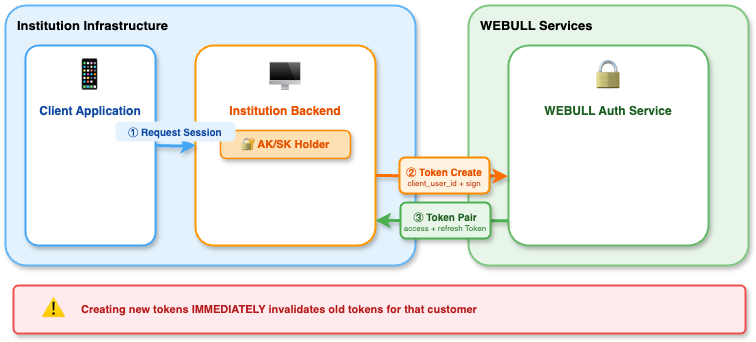
When creating a new token pair for an existing customer, any previously issued tokens for that customer are immediately invalidated. Ensure your application is prepared to handle this transition seamlessly.
Token Management:
- Implement secure token storage mechanisms appropriate to your architecture
- Never expose your Secret Key outside your backend infrastructure
- Monitor token usage patterns for security anomalies
Stage 2: Token Refresh Flow
When the access token approaches expiration, your system must obtain a new token pair through WEBULL's refresh endpoint.
Refresh Authentication Requirements
All token refresh operations require AK/SK signature verification:
Refresh Sequence:
- Your institution backend constructs a signed refresh request to WEBULL's token refresh endpoint, including:
- The refresh token
- Request signature (generated using your Secret Key following the signature specification)
- WEBULL's authentication service validates both the refresh token and the request signature, then issues a new credential pair
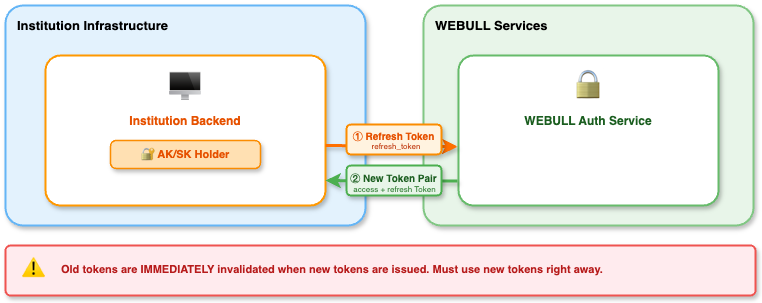
After successfully refreshing tokens, transition to the new token pair as soon as possible. While the old access token may remain valid for a brief grace period, delaying the switch may result in authentication failures.
Architectural Benefits:
- Enhanced Security - Secret Key never leaves your backend infrastructure
- Centralized Control - Full audit trail and revocation capabilities
- Fraud Prevention - Signature validation prevents unauthorized token refresh attempts
WEBULL's token refresh endpoint requires AK/SK signature authentication. Your institution's backend must sign all refresh requests - the specific implementation of when and how refresh is triggered is flexible based on your architecture.
Security Considerations
Credential Protection:
- Never embed your Secret Key in client-side code
- Implement secure storage for refresh tokens based on your architecture
- Use HTTPS for all communication between your components and WEBULL services
Token Lifecycle Management:
- Implement token refresh logic before access token expiration (recommended: when 80% of TTL elapsed)
- Monitor for unusual token refresh patterns (frequency, geographic distribution)
- Implement rate limiting on token refresh operations
Request Signing:
- All token operations (generation and refresh) require request signatures following the signature specification
- Your backend acts as the cryptographic authority for all token operations