OAuth Integration Guide
Webull API uses the OAuth 2.0 protocol for authentication. OAuth 2.0 is a widely adopted authorization framework that enables third-party platforms to integrate with Webull's OAuth endpoint securely.
Roles
| Role | Description | Example |
|---|---|---|
| Service Provider | The platform that uses OAuth 2.0 to grant third-party applications limited access to user accounts. | Webull |
| User | An individual with an active account at the service provider. | A Webull account holder. |
| Third-party Platform | An application that accesses the service provider's resources via OAuth 2.0 with the user's authorization. | Your application. |
Authorization and Token Flow
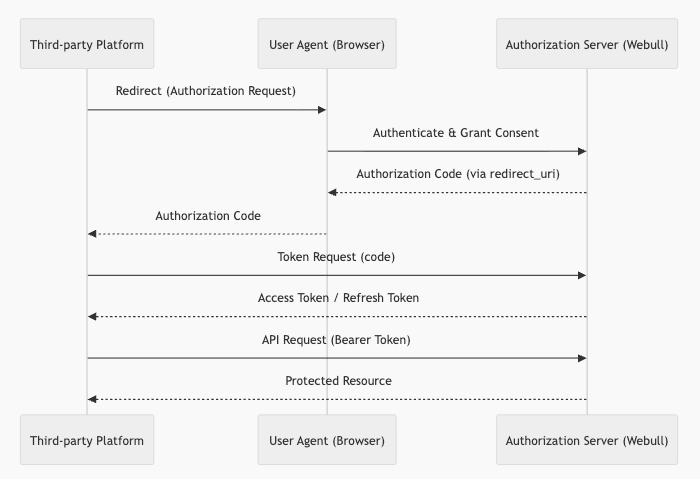
The following diagram illustrates the OAuth 2.0 authorization flow:
Step 1: Submit Your Application
Submit your application through the Application Form. Please provide the following information:
- Company name
- Redirect URL (the callback endpoint to which Webull redirects the user after authorization)
Once submitted, our business team will reach out to you. For any questions, contact connect.api@webull-us.com.
Step 2: Receive Application Credentials
After successful registration, Webull will issue the following credentials:
| Parameter | Description |
|---|---|
client_id | Your application's unique identifier. |
client_secret | A secret key used for server-to-server authentication. |
scope | The authorized scope of access for your application. |
app_key | Used for request signing. |
app_secret | Used for request signing. |
You must securely store the client_secret and app_secret. Never expose them to end users or third parties. If a compromise or potential exposure is detected, contact us immediately to rotate your credentials.
Step 3: Obtain an Authorization Code
Use the Get An Authorization Code API to initiate the authorization flow.
- The user is redirected to Webull's authorization page in the browser.
- After the user grants permission, Webull redirects back to your registered callback URL with an authorization code.
- The authorization code expires after 60 seconds and can only be used once.
Step 4: Create an Access Token
Use the Create Access Token API to exchange the authorization code for an access token.
- The access token is required for all subsequent API requests.
- Access tokens expire every 30 minutes (the exact expiration time is included in the API response).
Step 5: Refresh the Access Token
Use the Refresh Access Token API with a valid refresh token.
- A new access token and refresh token will be issued upon each refresh.
- Refresh tokens expire after 15 days (the exact expiration time is included in the API response).
- After the refresh token expires, the user must re-authorize your application.
Making API Calls
Include the access token in the Authorization header using the Bearer scheme.
Example: Query Account List
Sandbox environment:
curl -X GET "https://oauth-open-api.sandbox.webull.com/oauth-openapi/account/list" \
  -H "Authorization: Bearer <your_access_token>" \
  -H "accept: application/json"
Production environment:
curl -X GET "https://us-oauth-open-api.webull.com/oauth-openapi/account/list" \
  -H "Authorization: Bearer <your_access_token>" \
  -H "accept: application/json"
Token Lifecycle Summary
| Token | Validity | How to Obtain |
|---|---|---|
| Authorization Code | 60 seconds | User authorization via browser redirect. |
| Access Token | 30 minutes | Exchange authorization code or refresh token. |
| Refresh Token | 15 days | Returned alongside the access token. |